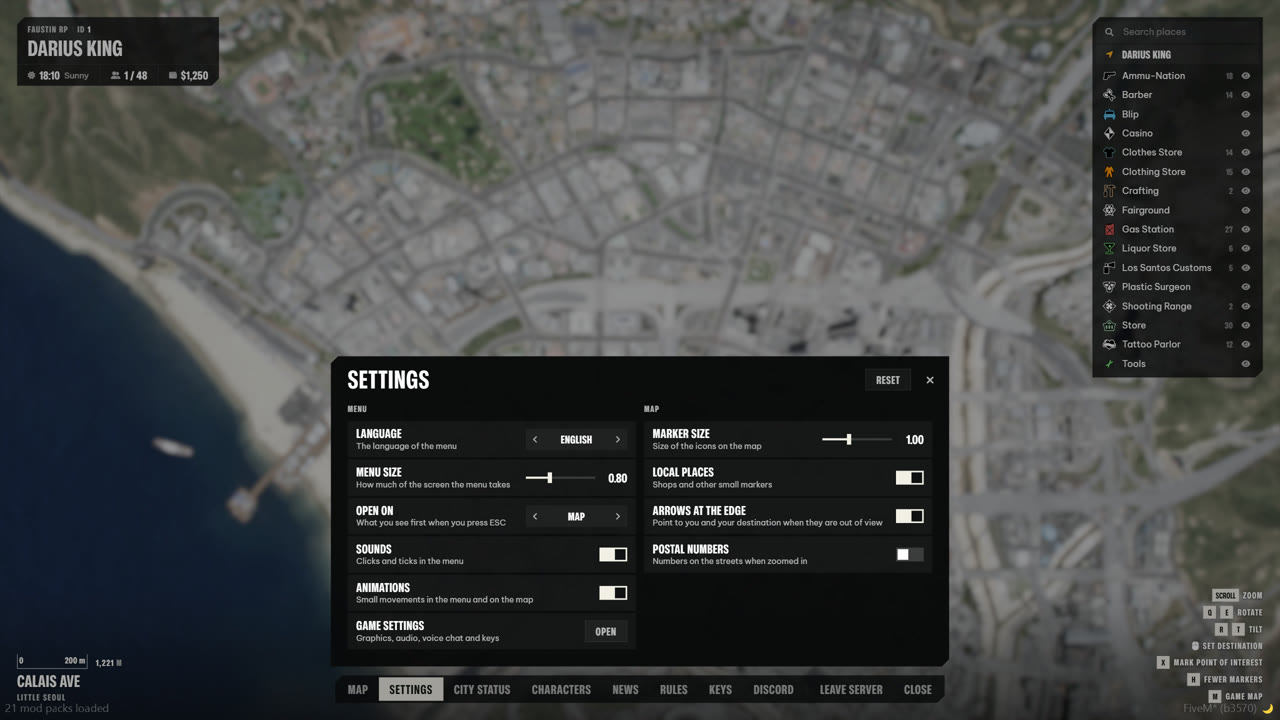
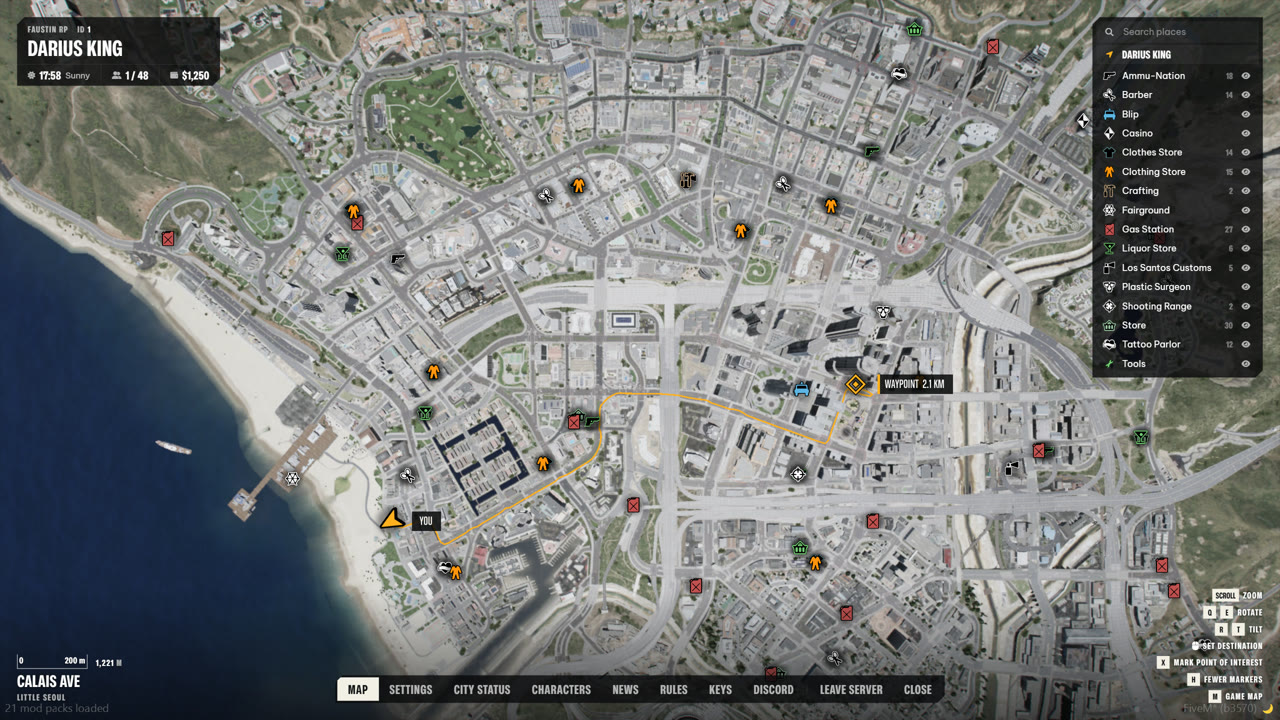
This is a real screenshot of the Pause Menu's city map. Move over it to look closer. In game you zoom from the whole state to street level, set a destination that follows the roads, and every blip on your server lands in the legend.
Right click sets a destination, drawn along the roads
Postal numbers when zoomed in, area names when out
A 20 metre sight limit keeps the map fair for roleplay
Screenshot, Pause Menu & City Map 1.0 · magnified 2.6×
05How we build
Four rules. Every script.
R.01
Costs nothing at rest
When its menus are closed, Character & Spawn measures 0.00 ms in resmon. Work only happens while someone is looking at it.
R.02
Your framework, found
Qbox, QBCore and ESX are detected on start. On Qbox the real qbx_core callbacks run, so slot limits and ownership checks stay yours.
R.03
Configured in the game
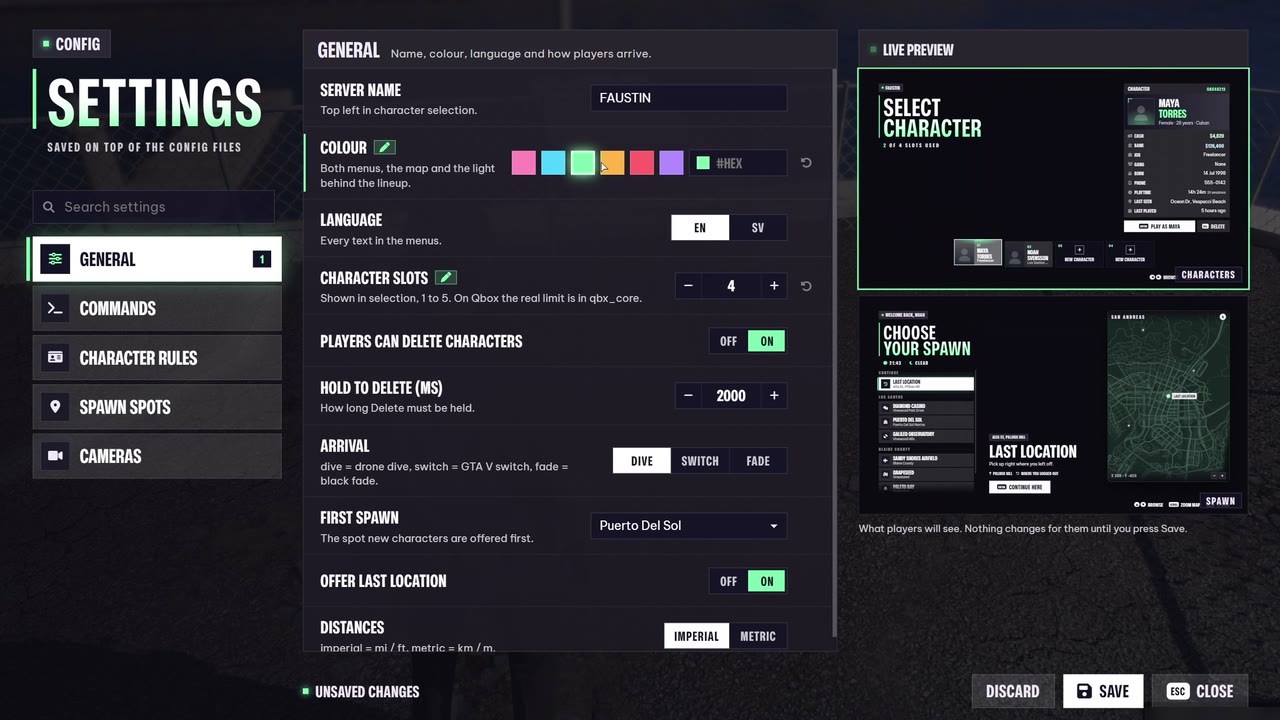
/pmconfig and /mcconfig change colours, rules and spots with a live preview. Saved on the server, kept through every update.
R.04
Open where it matters
Code is protected with Cfx escrow. Config and language files stay open, so texts, locations and rules are yours to change.
REC06Faustin Lab
Faustin Lab
What is on the bench right now. Work in progress, filmed in the game, shared before it is finished.
ARRIVAL STUDIO · IN GAME00:00:00/ARRIVAL · LIVE CANVASZOOM 1.0×SELECTED
In development
Faustin Arrival
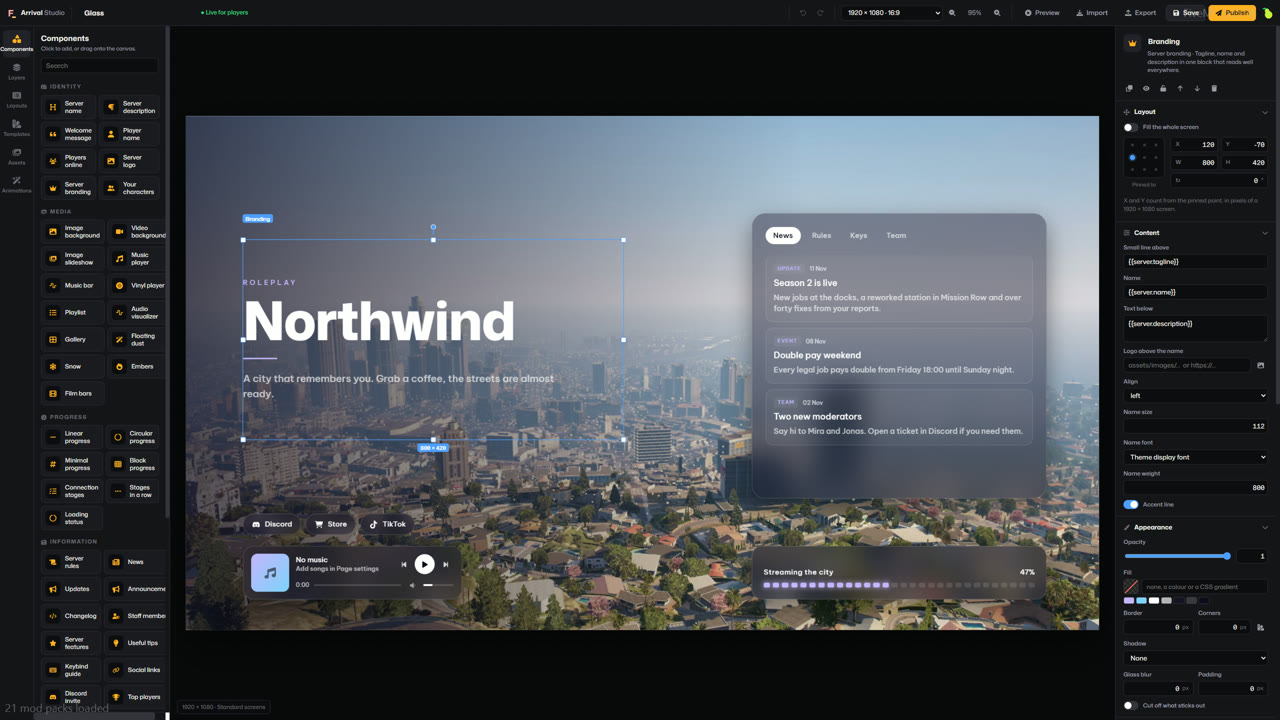
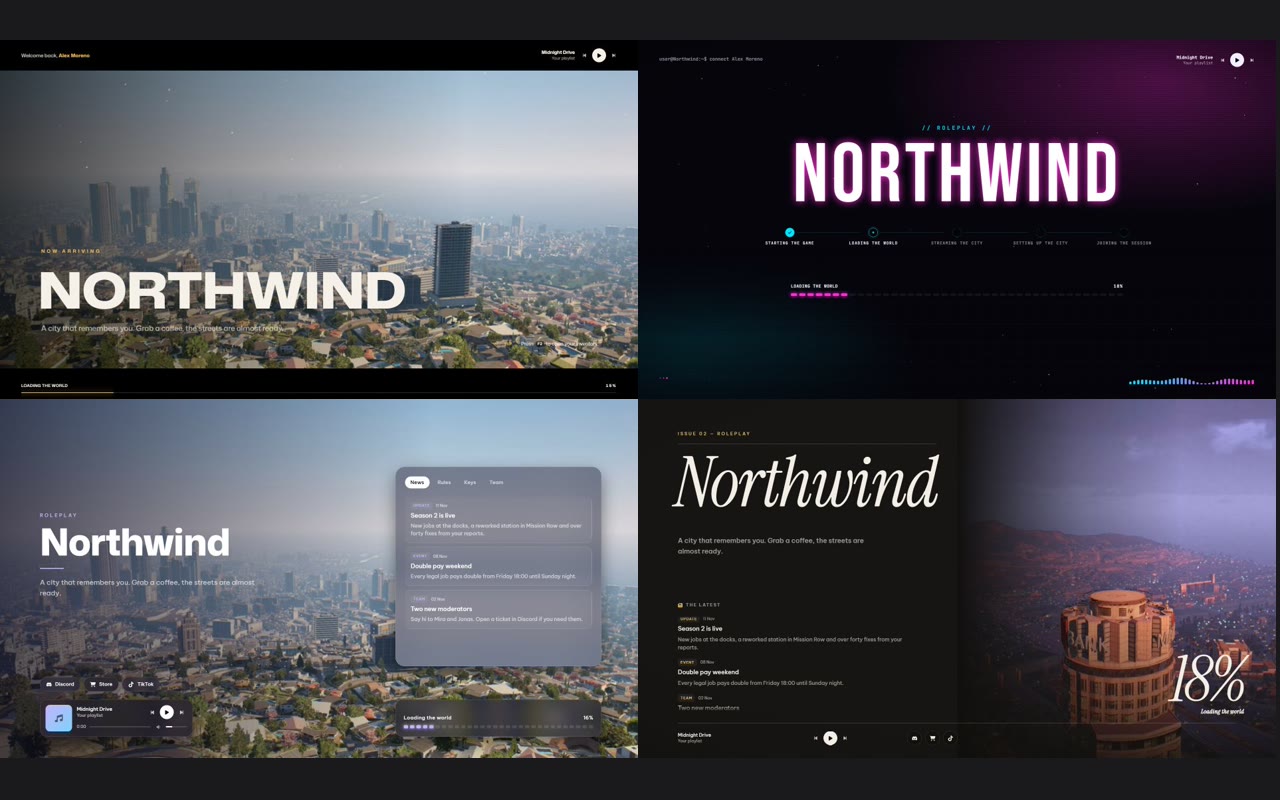
A free loading screen with an editor inside the game. Pick a template, drag things where you want them and press Publish. The next player who joins sees it, no restart.
Arrival Studio in game: move, resize, layers, undo, and a preview for ultrawide and 4:3 screens
Six templates and about 30 components, from music and Discord to the real loading progress
Publish without a restart, and roll back to an earlier version
Free and open source, for Qbox, QBCore, ESX or standalone
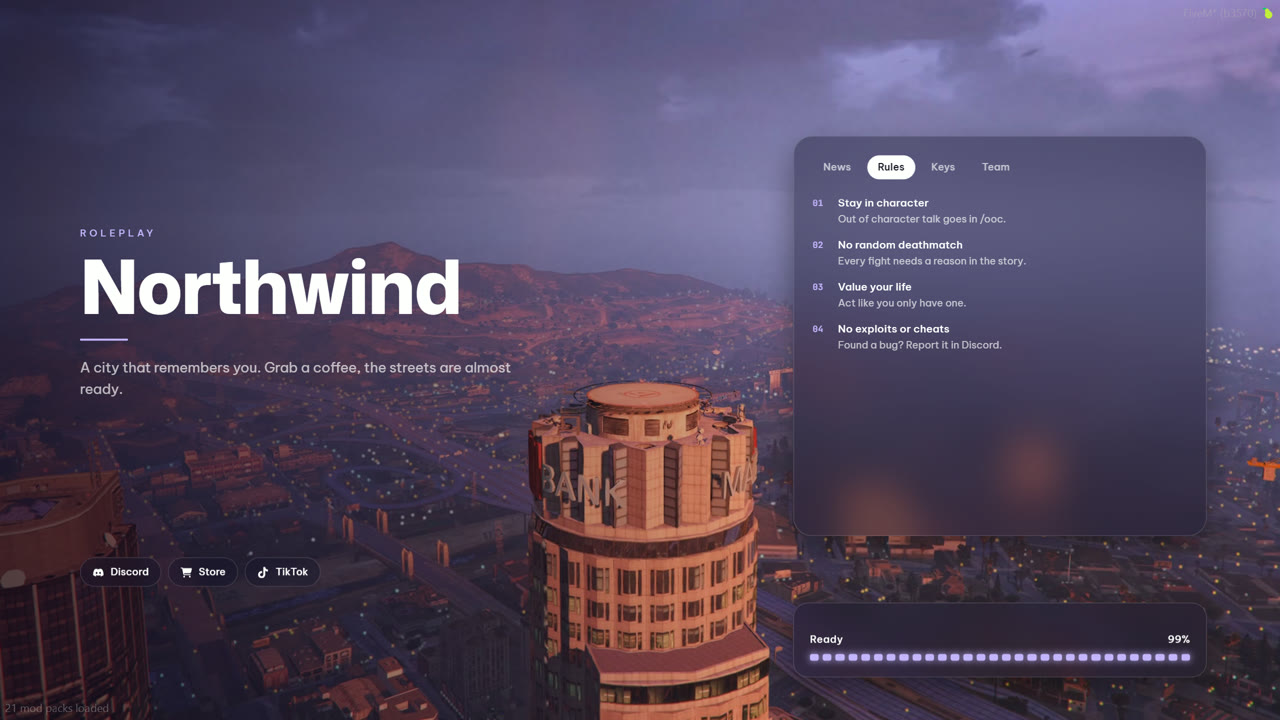
Frosted panels over your own pictures. News, rules, keys and team switch by themselves while the city loads.
EXP-03 · 2026-11-16 · In development
Six starting points
Cinematic, Minimal, Glass, Neon, Editorial and City Hub. Every part of each one can be changed in the studio.
EXP-02 · 2026-11-14 · Shipped in 1.6.1
A new photo camera
Clearer character photos with the face in the middle and cleaner edges around the hair. Now in Character & Spawn.
EXP-01 · 2026-11-10 · Shipped
ESC opens on the map
The pause menu goes straight to the live 3D map, with everything else one tab away.
07Under the hood
Read the code before you buy.
local menu = exports.faustin_pausemenu

-- opening
menu:Open()                 -- or menu:Open('status'), menu:Open('settings')
menu:Close()
menu:Toggle()

-- markers on the map
local id = menu:AddMarker({
    coords = vec3(100.0, 200.0, 30.0), -- or entity = vehicle, it then follows the entity
    sprite = 60,                       -- or icon = 'name' from web/blips/custom
    colour = '#4fd8c4', label = 'Patrol', group = 'services',
    edge = true,                       -- arrow at the edge of the map when out of view
    cone = { fov = 70, range = 60 },   -- view cone, takes heading from the entity or from heading =
})

-- your own settings on the Settings tab, saved per player
menu:AddSettings('phone', { label = 'Phone', col = 'map', items = {
    { key = 'silent', label = 'Silent mode', hint = 'No ringtone', type = 'bool', default = false },
} })
{ id = 'pd_mrpd', group = 'city', label = 'Mission Row PD', district = 'Mission Row', icon = 'shield-halved',
coords = vec4(428.0, -984.0, 30.7, 90.0),
description = 'Start your shift at the station.',
tag = 'Police', zoom = 5, job = 'police' },
Config.groups = {
{ id = 'last', label = 'Continue' },
{ id = 'property', label = 'Your properties' },
{ id = 'city', label = 'Los Santos' },
{ id = 'county', label = 'Blaine County' },
}
ensure oxmysql
ensure ox_lib
ensure qbx_core
ensure illenium-appearance
ensure faustin_multichar
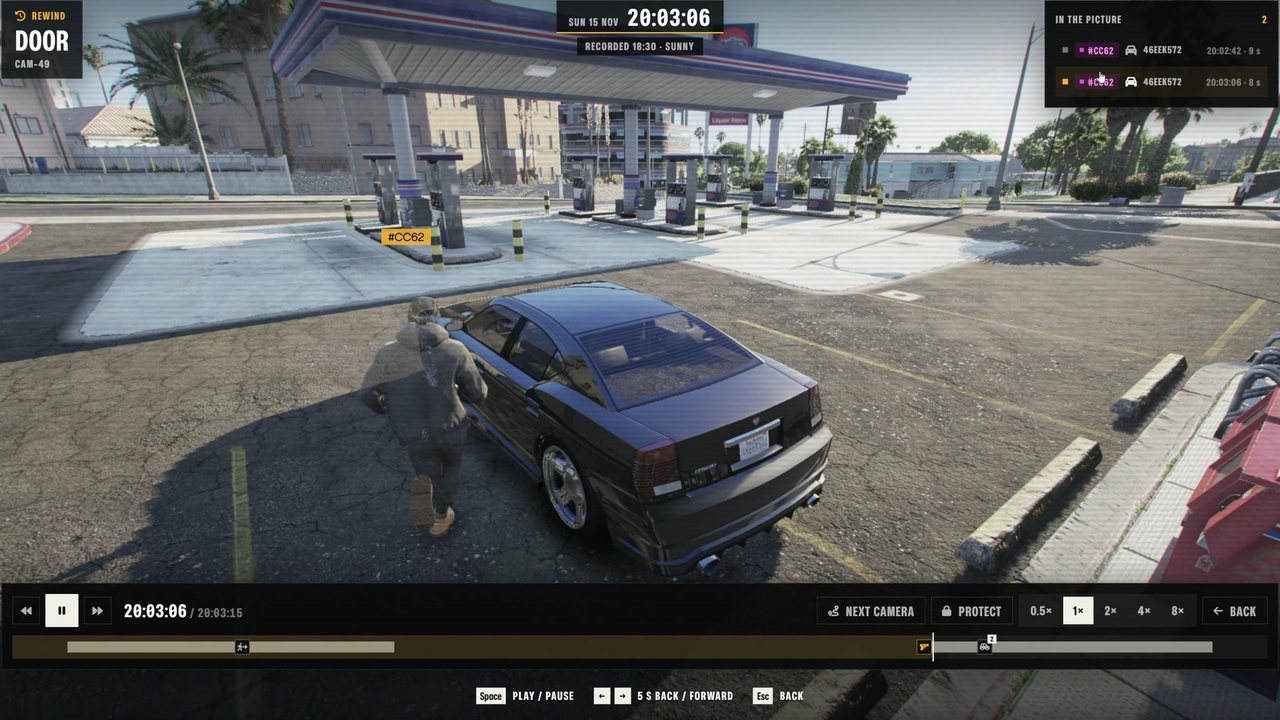
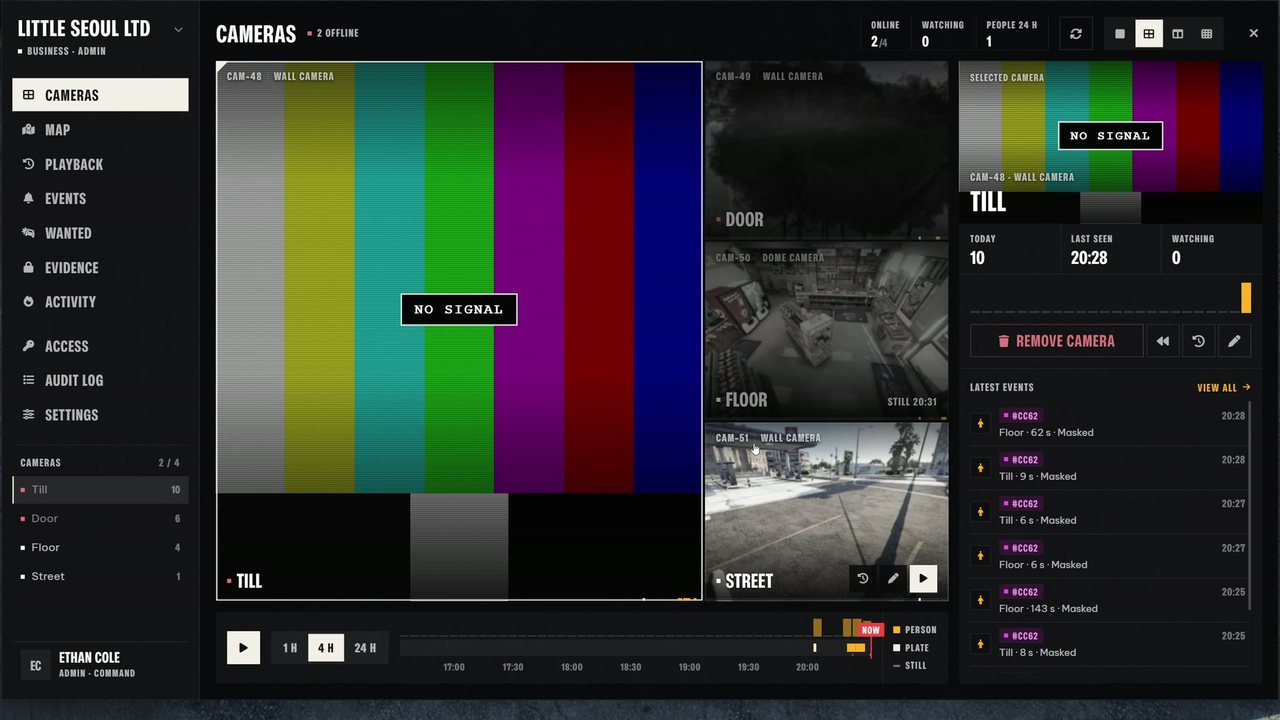
Mount a camera with an item, open the console on a computer, a TV or a tablet, and watch. When something happens, rewind it: everyone the camera saw comes back as a see-through ghost on the path they walked.
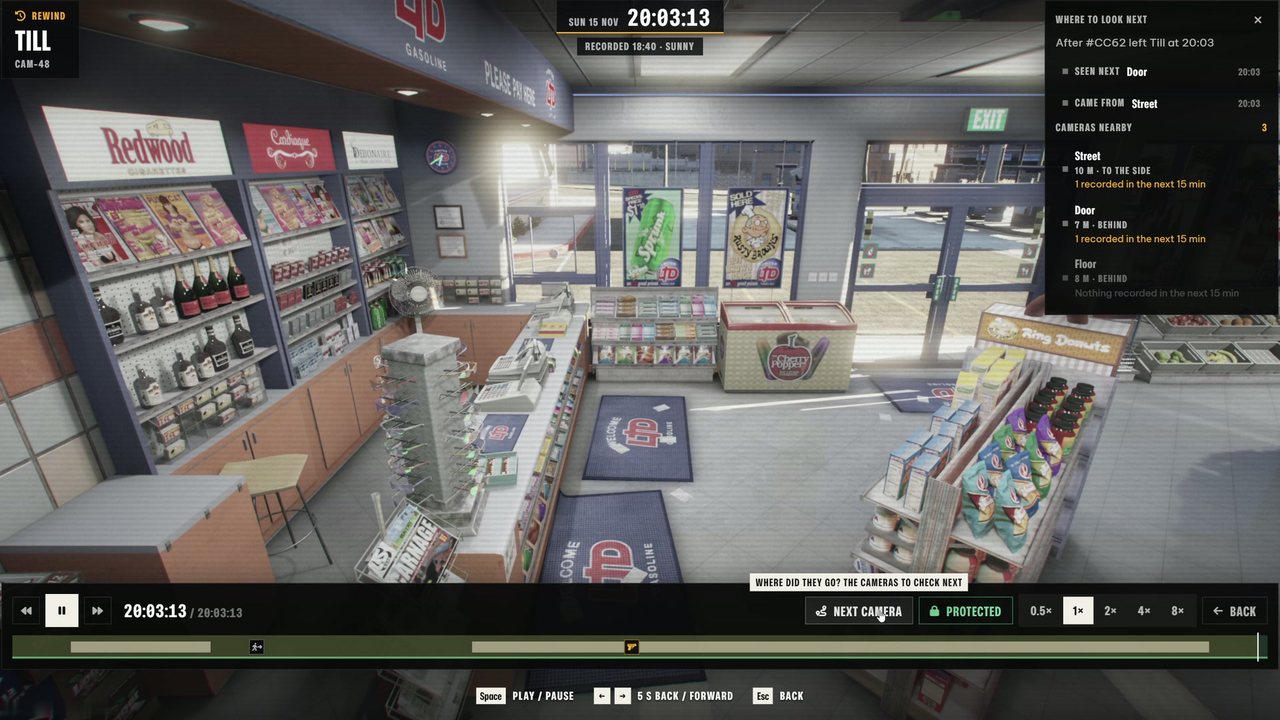
Rewind what happened. The people a camera recorded walk again in its own picture, with the light and weather of that moment and their actions on the timeline.
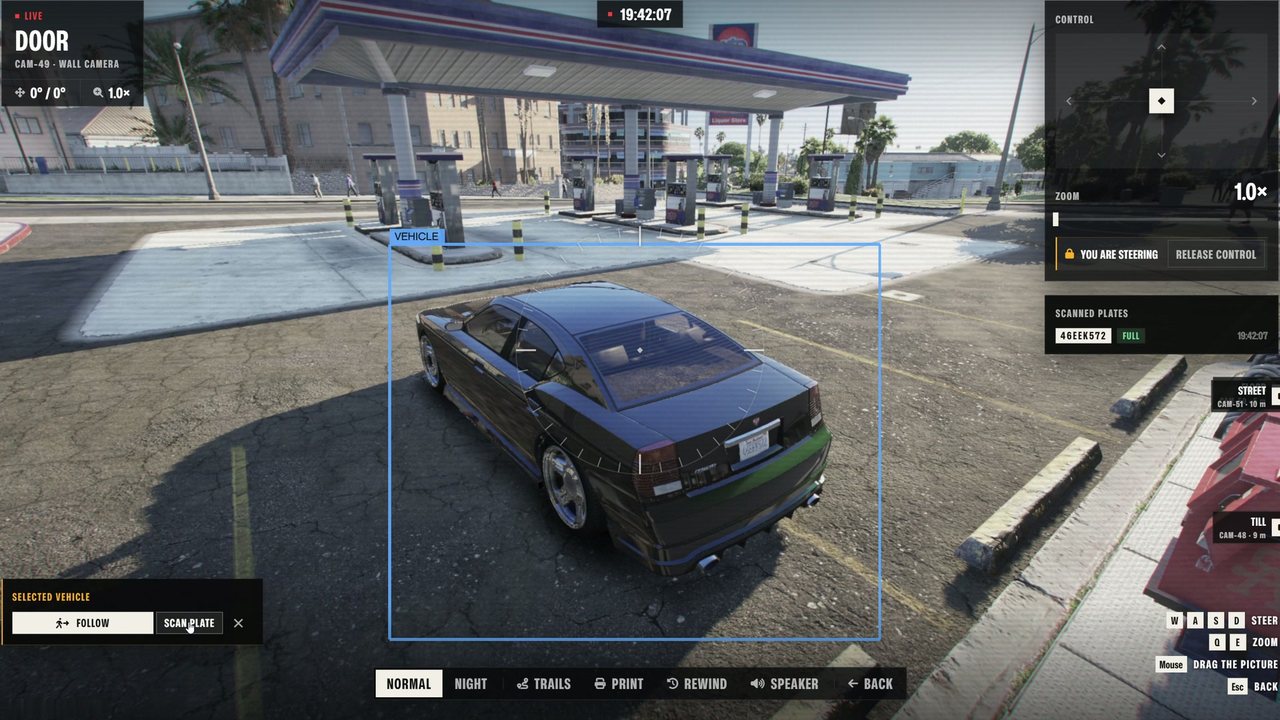
Steer it live. Pan, tilt and zoom, night vision and thermal. Select a car to scan its plate, enhance to read the rest.
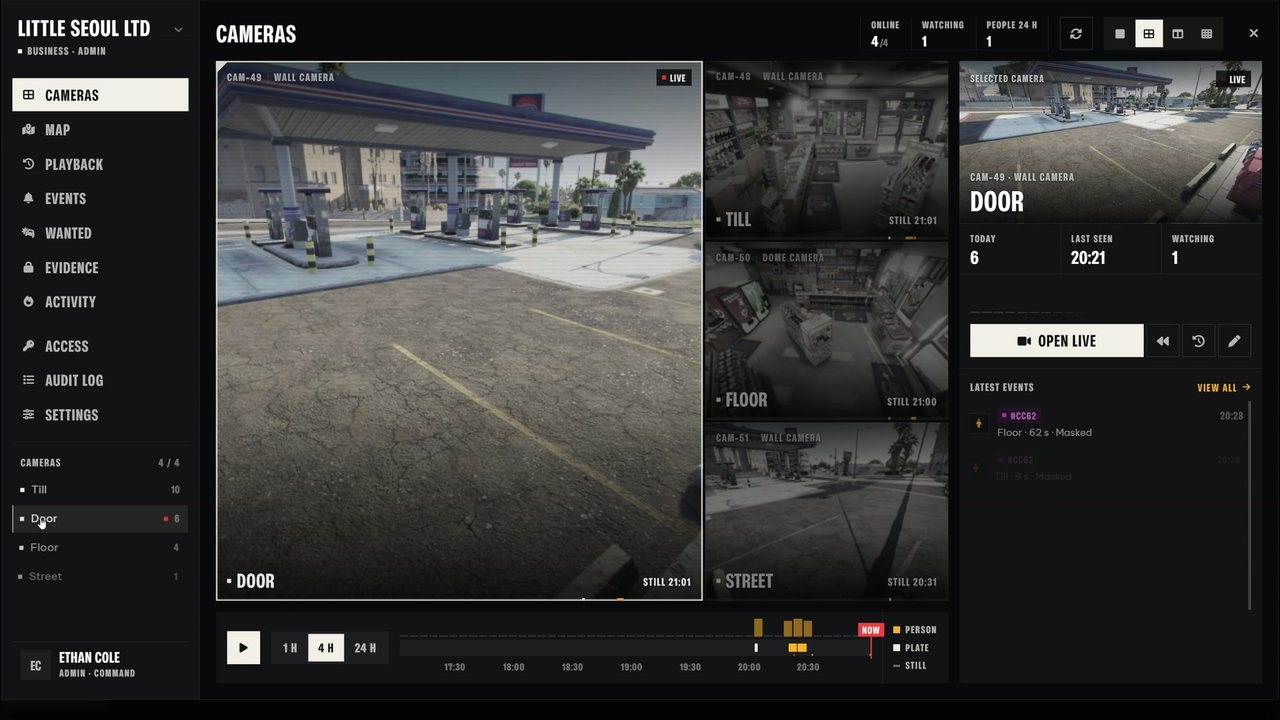
Every camera, one wall. The cameras of a network side by side, with who is watching and the latest events.
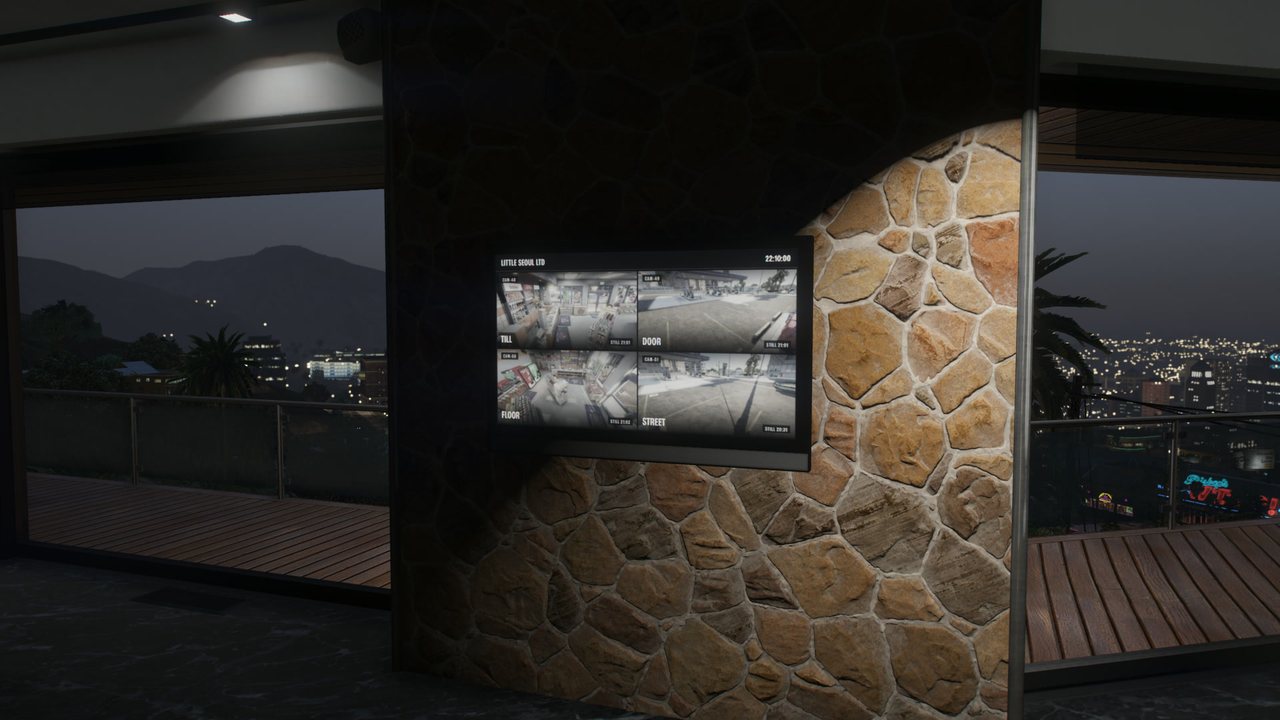
On the wall of the shop. A TV or a computer screen shows the latest stills of the network's cameras, four at a time, for everyone in the room. Use it to open the console.
02Features
What it does
F.01
Rewind and follow the trail
Recordings are stored as data, not video, so they are small and kept for days. After someone leaves the picture, Next camera shows where to look.
Got into a car, drew a weapon, fell or ran: marked on the timeline
Protect a stretch of footage as evidence
Recordings stay when a camera is taken down
F.02
Map, wanted and area search
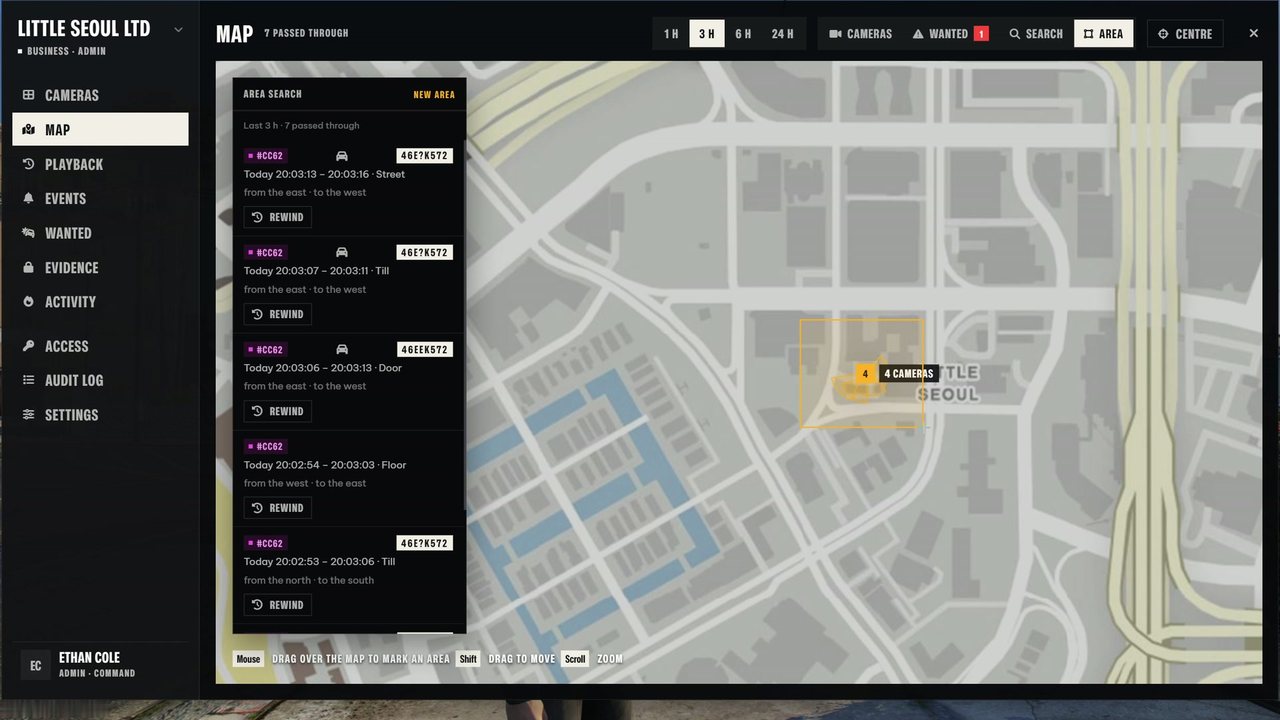
People are anonymous tags until someone names them. Mark a tag or a plate as wanted and every camera of the network alerts when it sees them.
Drag a box on the map: who passed through
Wanted routes drawn camera to camera
Search by name, off by default
F.03
They will try
Cameras can be shot, sprayed over or jammed. A shot camera hangs broken from its mount and its feed shows NO SIGNAL, but what it recorded stays.
Police calls through your dispatch
Phone alerts through lb-phone
Talk through the camera's speaker
F.04
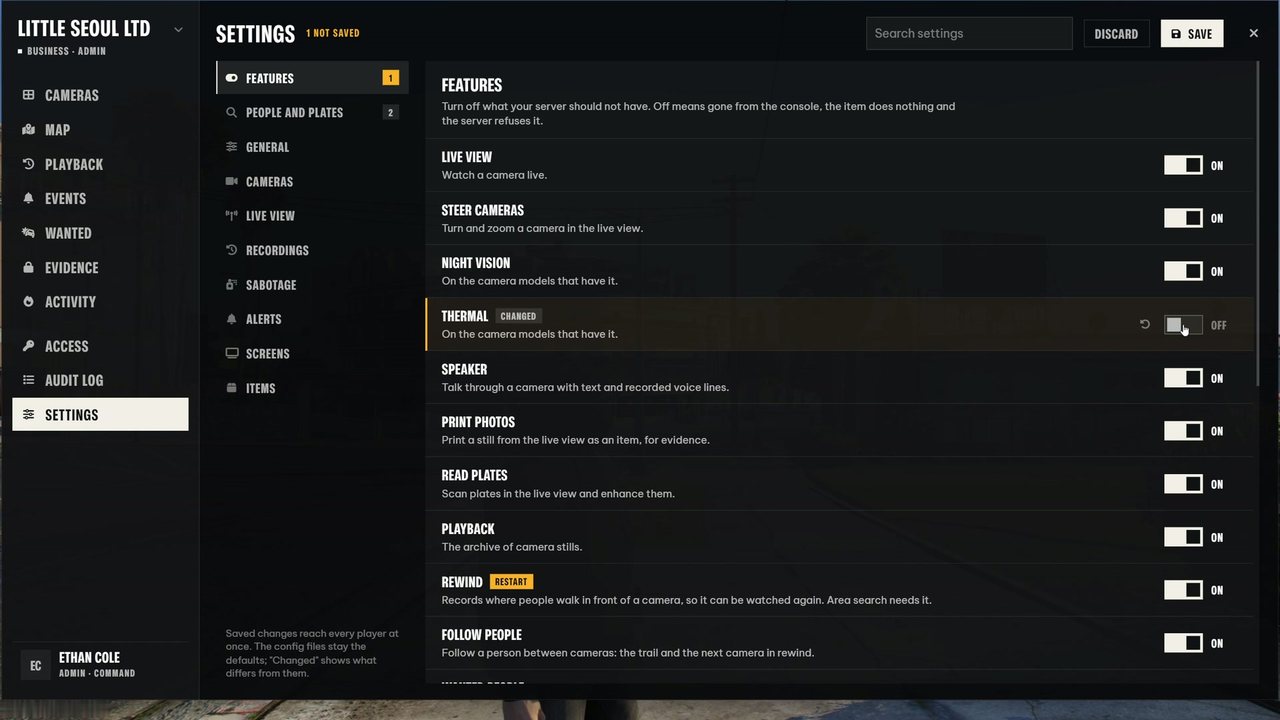
Configured in the game
About 120 settings in ten groups, from a switch per feature to how long recordings are kept. Saved on the server and live for every player at once.
Delivered to your Cfx Portal right after payment. Free updates.
Questions
Is the rewind a video recording?
No. The server writes down where each player in view walks and what they do, four times a second. Rewind rebuilds it in the game as see-through ghosts, so it costs a few kilobytes instead of a video file.
Do NPCs get recorded?
No, only real players. The server works out what a camera can see and asks a nearby player's game for the line of sight.
Can screens in the world show a live picture?
GTA can render one camera at a time, so placed TVs and computers show the latest stills of the cameras and page through them. The console gives the live picture.
Which inventories and dispatch scripts work?
ox_inventory, qb-inventory and the default ESX inventory, with the item files in the install folder. Police calls go through ps-dispatch, cd_dispatch, rcore_dispatch or lb-tablet, or the built-in notification and blip.
Can I turn features off?
Yes, every feature has a switch in the config and in /cctvconfig. A feature that is off is gone from the console and the server refuses it.
Which languages are included?
English, Swedish, German, French, Spanish, Portuguese, Italian, Dutch, Polish and Turkish. Copy en.lua to add your own.
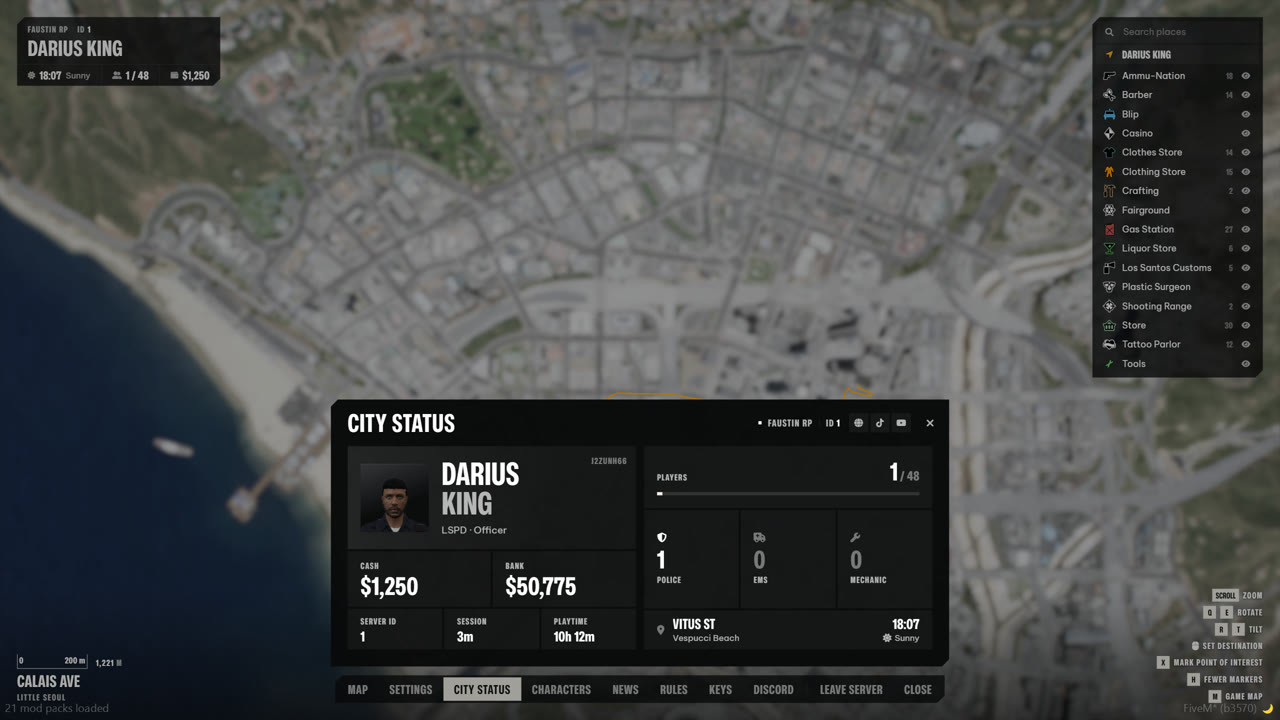
ESC flies the camera up to a live 3D map of the real city. The tabs sit in a dock along the bottom: Map, Settings, City status, News, Rules, Keys, Discord, Leave and Close.
The whole city, live. Drag to move, scroll to zoom, Q and E to rotate, R and T to tilt. Arrows at the edge point to you and your destination.
City status at a glance. Character card, cash and bank, playtime, who is online and how many police, EMS and mechanics are on duty.
Settings for every player. Language, menu size, what ESC opens on, sounds, marker size and postal numbers, saved per player.
02Features
What it does
F.01
The whole city, live
Zoom from the whole state down to street level, rotate and tilt. Every blip on your server shows up in the legend.
Destinations follow the roads
Search, filter and hide blips
Postal numbers and your own points
F.02
City status at a glance
Character, cash and bank, playtime, players online and who is on duty, with the time and weather where you stand.
News, rules and keybinds pages
Countdown to the next restart
Add pages from other scripts
F.03
Settings for every player
Players set language, menu size, sounds and what the map shows. Admins change colours, layout and blips in game.
Delivered to your Cfx Portal right after payment. Free updates.
Questions
Which frameworks does the pause menu work with?
Qbox, QBCore and ESX are found automatically. Set Config.framework = 'standalone' on a server without a framework, the character card then leaves out money and job.
Does it replace the GTA pause menu?
Yes. ESC opens this menu instead (pick the keys in Config.openControls), and a button inside still opens the game's own settings for graphics, audio, voice chat and keys. Set mapMode to game if you want the menu without the 3D map.
Can players use the map to spy on others?
No. By default the map camera hides cars, people and players more than 20 metres from your character, so the map stays fair for roleplay. You can change the distance or turn it off.
Does it support postal codes?
Yes. Postal numbers show when zoomed in, with the new or ocrp postal set, or off.
Can other scripts add pages or markers?
Yes. Exports let your scripts add tabs, markers, legend headings and settings, and everything a resource adds is removed when it stops. See the exports docs.
Which languages are included?
English, Swedish, German, French, Spanish, Portuguese, Italian, Dutch, Polish and Turkish. Copy en.lua to add your own.
One script replaces your multicharacter and spawn resources. It finds Qbox, QBCore or ESX by itself, and takes a player from the first login to the moment they land in the city.
02Showcase
Try the ID card
STATE OF SAN ANDREASIDENTIFICATION
Last
TORRES
First
MAYA
DOB
04/12/1996
Nationality
AMERICAN
SA-0000000Maya Torres
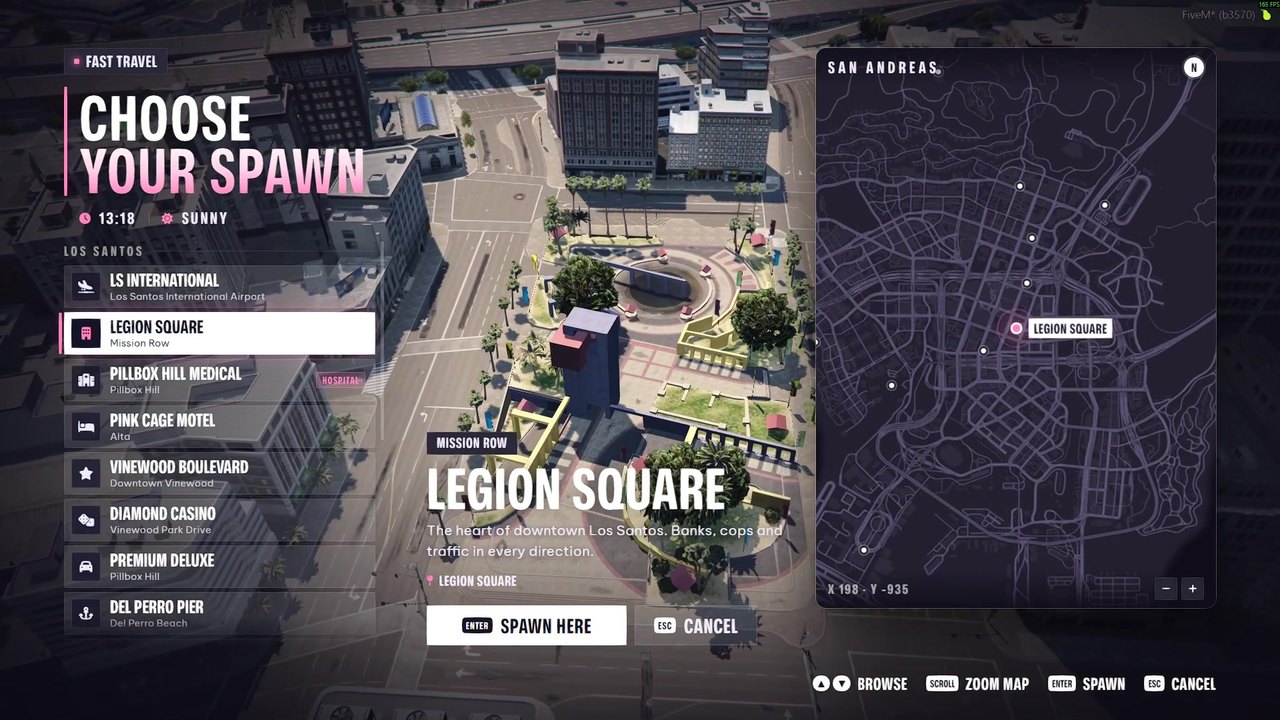
Three ways to land
The drone dives in one smooth move to just behind your character, routed around buildings.
The classic character switch: up into the sky, across, and down.
A plain fade to the spot.
Schematic, not a recording · Config.transition
03Features
What it does
F.01
A first minute that sets the tone
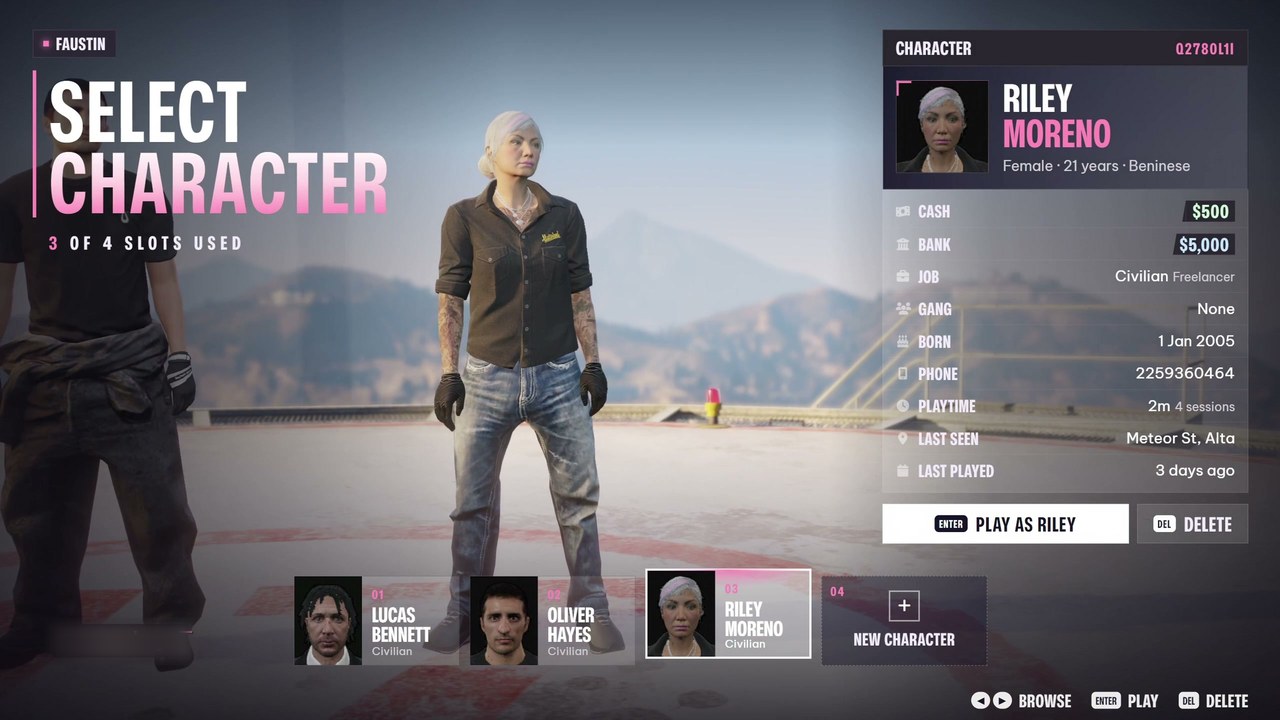
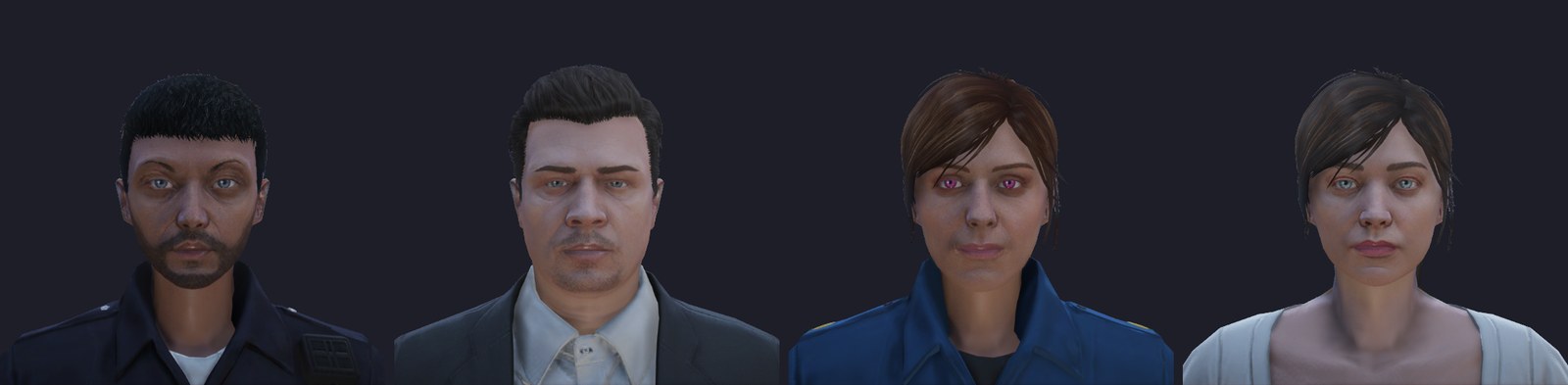
Characters stand side by side on a rooftop helipad while the camera glides from one to the next.
HD headshots and a details panel
Live ID card while you type
Straight into the appearance editor
F.02
Spawn with one smooth dive
A drone camera circles the spot you pick, then dives to just behind your character, routed around buildings.
Map with pins and zoom
Job locked spots and properties
/spawnmenu fast travel
F.03
Configure everything in game
Type /mcconfig and change settings and spawn spots in the game, with a live preview of both menus.
Colour presets or your own
Add a spawn spot where you stand
Kept through updates
04Compatibility
Replaces what you run now
QboxReplaces qbx_multicharacter and qbx_spawn
QBCoreReplaces qb-multicharacter and qb-spawn
ESXShips an empty esx_multicharacter
Frameworks
Qbox, QBCore and ESX
Needs
ox_lib and oxmysql
Spawn spots
16 included, add as many as you like
Transitions
Dive, classic switch and fade
Languages
2 included, add yours in one file
Colours
6 presets, or pick your own in game
Config
Config files, and in game with /mcconfig
Delivery
Cfx Portal, escrow protected
05Performance
Measured, not promised
Menus closed0.00 ms
Character selection or spawn menu open0.02–0.04 ms
During the diveup to 0.08 ms
Measured in resmon on Qbox with version 1.2.0. Errors are caught: the player gets the picture and control back and the error goes to the server console.
Delivered to your Cfx Portal right after payment. Free updates.
Questions
Does it replace qb-multicharacter and qb-spawn?
Yes. On QBCore, remove qb-spawn and qb-multicharacter: this one script does both. The old qb-spawn:client:openUI event still opens the spawn menu, so older scripts keep working.
Does it work with ESX and esx_multicharacter?
Yes. ESX only keeps several characters per player while a resource named esx_multicharacter runs, so the script ships an empty one in extras/esx_multicharacter to use in its place, started before es_extended.
How does it work on Qbox?
It replaces qbx_multicharacter and qbx_spawn and uses the qbx_core character callbacks, so Qbox rules like slot limits, starter items and ownership checks stay in force. Owned properties from qbx_properties show up as spawn spots.
How many characters can a player have?
Up to 5 slots are shown, set with Config.maxSlots. On Qbox the real limit per player comes from qbx_core.
What do I need to run it?
One framework (Qbox, QBCore or ESX), ox_lib and oxmysql. New characters go straight into illenium-appearance. The full list is in the installation docs.
Can I add my own spawn locations?
Yes. 16 spots are included. Stand where you want one, type /mcconfig and press Add spot here, or add it in config/spawns.lua. Spots can be locked to a job.
Every FiveM script from Faustin Resources for Qbox, QBCore and ESX. Delivered to your Cfx Portal right after payment. Config and language files stay open, updates are free. Start with the Pause Menu or Character & Spawn.
Loading scripts…
↺Changelog
News
What changed in our scripts and on the store, newest first.
?Help
Support
Installing? Start with the docs. Anything else goes to Discord, where the developer answers.
Join the Discord
Questions before you buy, or something not working? Talk to the person who wrote the code.


 Qbox
 QBCore
 ESX